
Grok Imagine is pretty easy to sum up: it’s fast, low-cost, good at making animated short clips, and it comes with built-in audio. It supports both text-to-video and image-to-video, and when it works well, the results can look genuinely impressive.
But it also has some clear downsides. It does not handle complicated prompts very well. Multi-shot videos can feel jumpy, and character movement, voice, music, and lip sync are not always easy to control.
So if you want to quickly make short videos, animate still images, or create a simple video of one real person talking to camera, Grok AI video is a good fit. But if you want to create a complex story, a multi-shot scene, a performance with several characters, or a polished commercial ad, Grok Imagine is probably not the best choice.
When Grok Imagine Works Well, When It Doesn’t
| Use Case | Best For | Not Ideal For |
|---|---|---|
| Social short videos | TikToks, Reels, Shorts, X videos, memes, and quick visual hooks | Long videos, complex stories, multi-shot narratives |
| Image-to-Video | Animating still images, product shots, people, and characters | Complex action, multi-person scenes, realistic motion accuracy |
| Text-to-Video | Turning ideas into quick video drafts and testing concepts | Complex prompts or strict scripted action |
| Product videos | Product motion, push-ins, lighting changes, and ad concept clips | Polished commercial-ready videos |
| Character animation | Simple talking, smiling, head turns, and light character movement | Complex body motion, multi-person dialogue, long identity consistency |
| Audio videos | Ambient sound, dialogue, lip sync, and short audio-driven clips | Precise dialogue control or pro-level voice quality |
| Creative ad concepts | Testing ad visuals, brand direction, and social campaign ideas | Final commercial production or detailed storyboard control |
| Meme / absurd videos | Funny, weird, exaggerated, attention-grabbing clips | Serious brand videos or tightly controlled styles |
| B-roll / atmosphere | Cafes, streets, product mood shots, close-ups, background motion | Story-driving main shots |
Pros of Grok AI Video
Advantage 1: Fast Video Generation at a Low Cost
Grok Imagine’s biggest advantage is speed. Its image rendering is fast, and its image-to-video generation is quick enough for rapid testing. For AI video creators, that matters a lot. AI video generation rarely works perfectly on the first try. Most of the time, you need to tweak the prompt, swap the image, adjust the angle, change the motion, and run a few versions before you get a result you’re happy with.
Cost is another strong point. The official starting price for grok-imagine-video is $0.05 per second. xAI’s developer pricing page lists it at $0.05/sec, while the model details page breaks it down by resolution: 480p costs $0.05/sec, and 720p costs $0.07/sec. From an API cost perspective, Grok Imagine is a practical option for testing a lot of video ideas without burning through your budget too quickly.
So if you want to test a short video concept, you don’t have to start with a more expensive video generation model. You can use Grok to quickly generate a few versions first, then see which creative direction works best.
Advantage 2: It Works Surprisingly Well for Animated Shorts
Grok Imagine’s image-to-video results can be surprisingly impressive in the right scenarios. This is especially true for two types of content.
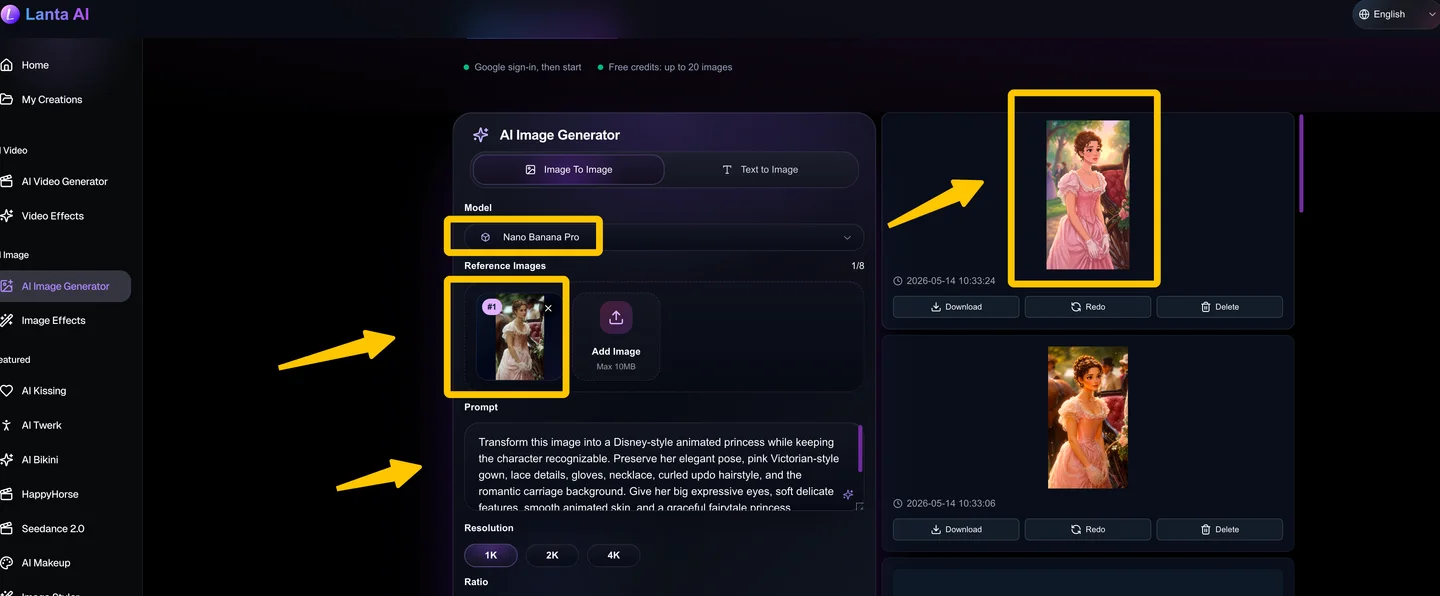
The first is turning photos of real people into a Disney- or Pixar-like animated style. If the person in the original image is clear and the background is not too busy, Grok can turn a still photo into a smooth animated short. The result can include clear facial expressions, visible emotion, natural-looking movement, and a stronger sense of camera flow.
The second is animating 3D cartoon characters, illustrations, doodles, and simple line drawings. Compared with realistic human faces, hands, and facial expressions, cartoon and illustration styles are much more forgiving. That makes Grok Imagine more likely to produce stable results with this kind of content.
For example, a 3D cartoon character turning their head, waving, talking, or jumping, or a hand-drawn doodle becoming a short animated clip, will usually hold up better than a realistic human video.
So if you are creating animated shorts, AI memes, cartoon character videos, or animated illustrations, Grok Imagine is definitely worth testing.
Advantage 3: AI Video Content Without Restrictions
Grok Imagine has another very controversial feature: generating video content without restrictions. It can generate some spicy content that other AI video tools may not easily pass through moderation.
For some users, this is attractive because it gives creators more freedom, especially when creating adult videos, NSFW content, undressing, and other explicit video content. Grok’s restrictions seem less strict. But this is also one of the reasons why it has been widely discussed by the media and users.
If it is for brands, platforms, or commercial content, you still need to be cautious. Because spicy content, character likeness, and non-consensual generated content are all issues that can easily lead to controversy.
Advantage 4: Native Audio
Native audio is one of Grok Imagine’s biggest strengths as an AI video generator. It doesn’t just create the visuals — it can also generate dialogue, lip sync, ambient sound, sound effects, and background music in the same pass.
That said, the audio is not always consistent. It tends to work best when the video shows one person facing the camera and delivering a short line. In simple scenes like this, one speaker, a clear front-facing face, and short dialogue, the voice and lip movement can feel fairly natural.
Its ambient sound and sound effects can also add a lot to the scene. If you are testing action scenes, sci-fi shots, animals, street ambience, wind, mechanical sounds, explosions, or other environmental sounds, Grok Imagine’s built-in audio can make the video feel much more immersive. You do not have to hunt for sound effects or add music separately in post.
Cons of Grok AI Video
Weakness 1: Grok Struggles with Complex Prompts
One of Grok Imagine’s biggest weaknesses is that it does not handle complex prompts very well. The most common issue is prompt overload. If you pack too many subjects, actions, camera shots, and visual details into a single prompt, the model starts to lose focus.
Grok AI video works better when the prompt stays simple: one subject, one main action, and one camera movement. For example, a prompt like “a cartoon girl turns around and smiles as the camera slowly pushes in” is much more likely to work well.
But if you ask for something like “start with a wide shot, have the character walk into a room, turn around and speak, cut to a close-up, introduce another character, and then show the two characters interacting,” Grok can easily lose control of the scene. The final video may skip details, mix up the action, or feel messy.
There is also a 15-second hard limit. That is fine for short clips, but it is not enough for a full story-driven video. Grok can help you generate a single video moment, but it is much harder to make it produce a complete short film with stable storytelling from beginning to end.
Weakness 2: Motion Blur and Close-Up Detail Issues
Grok Imagine’s video outputs can suffer from motion blur, especially around faces, hands, and close-up movement. Facial expressions and emotional details do not always look natural either.
This becomes more obvious in live-action close-ups, complex body movements, detailed hand gestures, or scenes with multiple people interacting. Grok may produce deformed fingers, stiff facial expressions, strange mouth movements, inconsistent character style, or frames where the same person no longer looks like the same person.
Complex scenes are another weak spot. When there are too many subjects, too many actions, or a busy background, the model’s attention gets spread too thin. As a result, the image can become blurry, the movement can feel unstable, and the whole scene may start to fall apart.
Weakness 3: Multi-shot videos can feel jumpy
If you want Grok Imagine to create a multi-shot video, it still does not feel very reliable. The biggest issue is that the cuts between shots can feel abrupt.
For example, if you ask for a wide shot that moves into a close-up, you would expect either a smooth push-in or at least a shot change that makes visual sense. But Grok sometimes jumps from one shot to another without much transition. Instead of feeling like one continuous cinematic sequence, the result can look like a few disconnected clips stitched together.
That is why Grok Imagine works better for single-shot short clips than for complex multi-shot storytelling.
Weakness 4: The voice, music, and delivery are hard to control
Native audio is one of Grok Imagine’s biggest strengths, but it can also become one of its biggest problems. The issue is not whether Grok can generate sound. The issue is whether the sound actually follows what you want.
With multiple speakers, the voices, lip sync, and character consistency can easily fall apart. A character’s voice may not match the person on screen. The age, gender, or tone can feel wrong. You might ask for a child’s voice and get something that sounds more like an adult woman. You might ask for relaxed, natural dialogue, and the delivery can come out awkward or unnatural.
The background music is another common complaint. Grok often produces a repetitive, synth-heavy “Grok sound.” After a while, it starts to feel like the same AI-generated background track being used again and again, and it does not always match the mood of the video.
It also gets frustrating when you try to give precise audio instructions. If you ask for no music, no voiceover, a specific music style, a certain accent, a certain age, singing, or a specific character tone, the result can be inconsistent.
Sometimes you write “no music,” and it still adds music. Sometimes you write “no voiceover,” and it still generates strange sounds anyway.
For video creators, this is a real workflow problem. Grok’s audio is useful for quick previews, but it is not reliable enough when you need precise control.
Conclusion
Grok Imagine is a strong option if you need a fast, low-cost AI video generator for short clips. Its biggest strengths are speed, built-in audio, image-to-video generation, and its ability to turn simple ideas into animated clips quickly. For creators making social media videos, meme-style content, talking-character clips, or quick visual drafts, it can be a very useful tool.
However, Grok AI video generation is not yet the best choice for complex storytelling, multi-shot scenes, detailed character performance, or polished commercial production.
Want to create your own AI videos with more creative options? Try Lanta AI Video Maker to turn text prompts, images, and ideas into eye-catching AI-generated videos. Start creating with Lanta AI today.