
Seedance 2.0 impressed us, but not for the reason most demo videos suggest.
The most interesting part was not pure video quality. It was control. In our tests, Seedance 2.0 was better at following shot direction, using visual references, and turning a simple storyboard into a video that felt more planned than random.
Seedance 2.0 gets closer to that than many prompt-only video models. But it also showed limits creators should not ignore. One test made its control feel impressive. Another showed where its physics still felt artificial.
Keep reading, and you'll see what Seedance 2.0 does well, where it breaks, and whether it is actually useful for video creators.
What Is Seedance 2.0?
Seedance 2.0 is an AI video model from ByteDance Seed. It helps creators make AI videos that are easier to control, more realistic, and closer to real production needs.
Unlike a basic text-to-video model, it can use text, images, video clips, and audio as references, so creators can guide the subject, camera movement, style, rhythm, and sound more precisely.
From Seedance 1.0 to Seedance 2.0
| Version | What It Added | How It Helped the Next Version |
|---|---|---|
Seedance 1.0 | Started the Seedance video model series | Gave the model the basic ability to create short AI video clips |
Seedance 1.5 | Added better audio-video sync | Helped sound and visuals work together more naturally |
Seedance 1.5 Pro | Improved image-to-video and audio generation | Built a stronger base for higher-quality and more stable video output |
Seedance 2.0Current | Brought text, images, video, and audio into one workflow | Combined references, editing, video continuation, multi-shot generation, and native sound into a more complete AI video creation tool |
Highlights of Seedance 2.0
Seedance 2.0 stands out in complex scenes, with stronger motion stability and more believable physical movement. It performs especially well in multi-person interactions and complex motion scenarios, producing more clips that creators can actually use.
For example, in a full pairs figure-skating routine, the model can generate synchronized jumps, mid-air rotations, and precise landings while keeping the movement physically believable from start to finish. This helps reduce many of the physics errors commonly seen in earlier AI-generated videos.
- Multimodal reference control. Users can provide up to 9 images, 3 video clips, and 3 audio clips, along with natural language instructions. The model can use these references to guide composition, motion, camera language, visual effects, and sound. It can even use text-based storyboards as creative references.
- More control over the final video. It offers stronger instruction following, better consistency, more stable video extension, and targeted editing. Creators can make precise changes to specific clips, characters, actions, or storylines. The model also adds prompt-driven camera planning, helping users create shots with clearer camera movement, framing, and visual flow.
- Dual-channel stereo audio generation. It supports simultaneous multi-track output, including background music, ambient sound effects, and character narration. These audio elements can be aligned with the visual rhythm of the scene, making the final clip feel more polished, immersive, and professionally timed.
- High-quality 15-second multi-shot output. In a single generation, it can create up to 15 seconds of multi-shot video with sound, giving creators more room to build complete visual moments instead of short motion samples.
Storyboarding and Camera Movement Test
We started with a football match because it is a good test of multi-subject interaction. The scene asks the blue team to complete five connected passes, move through the red team's defense, and score at the end.
Although this sounds complicated, the action can be split into clear moments. One shot can focus on the first pass, the next shot can follow the receiver, and another shot can show the defenders reacting. The camera needs to keep up with the ball, the players, and the changing focus of the play.
In our first test, we did not give the model a detailed storyboard or specific camera directions. We wanted to see how well it could handle the sequence on its own before adding more control.
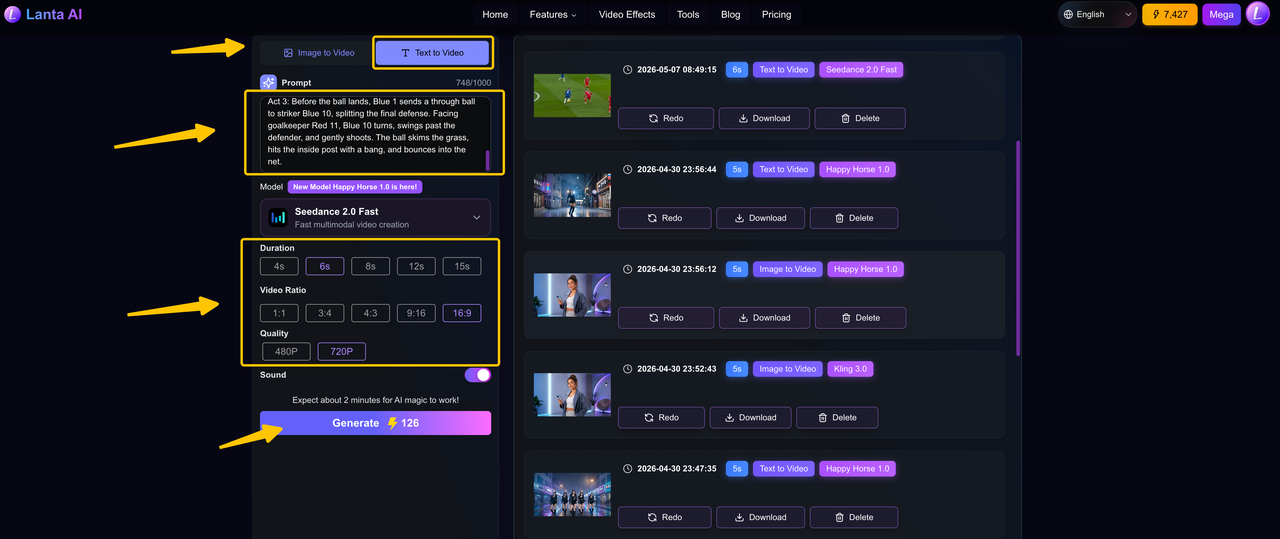
First pass without detailed shot direction
Football match. Blue team faces strong red defenders, completes five precise passes, then scores.

Act 1: Blue 8 is pressed by Red 3 and calmly passes to Blue 6. Blue 6 instantly sends a diagonal long ball to sprinting right winger Blue 7.

Act 2: Near the baseline, Blue 7 stops, cuts back to avoid Red 9's sliding tackle, then pushes the ball toward the penalty arc. Red 1 and Red 2 close in. Blue 7 flicks the ball through Red 2's legs back to the advancing Blue 1.

Act 3: Before the ball lands, Blue 1 sends a through ball to striker Blue 10, splitting the final defense. Facing goalkeeper Red 11, Blue 10 turns, swings past the defender, and gently shoots. The ball skims the grass, hits the inside post with a bang, and bounces into the net.
Result
Overall, the video result was good. Blue No. 10 did complete the final shot, but the full passing sequence was not fully reproduced. Instead of showing five clear connected passes, the video only showed about three.
In the middle section, several actions that were originally assigned to Blue No. 7 and Blue No. 1 were instead carried out by Blue No. 10. The confrontation between Blue No. 7 and the red defenders was also not clearly shown, so this part of the play felt less detailed than what the original prompt described.
Still, it is worth emphasizing that this was the first generation. We did not generate multiple versions and cherry-pick the best one. Reaching this level on the first try is already impressive, even with the flaws.
The storyboarding and camera movement were not wrong, but they also lacked a distinctive style. This may have been the model's way of playing it safe under a task with high information density.
Adding more detailed storyboarding and camera language
Next, we tested what would happen when more detailed storyboarding and camera movement instructions were added.
In a football match, facing strong red-team players, the blue-team players complete five precise passes and finally score.
Act 1: Opening the Play - Passes 1-2
Shot 1 - Medium Shot: At the center of the frame, Blue No. 8 faces pressure from Red No. 3 and calmly passes the ball with the inside of his foot to Blue No. 6, who drops back to receive it.
Shot 2 - Wide Shot: After receiving the ball, Blue No. 6 does not hold onto it. He immediately sends a precise diagonal long pass. The ball draws a beautiful arc through the air and lands accurately at the feet of Blue No. 7, the right winger sprinting forward.
Act 2: Breaking Through the Defense - Passes 3-4
Shot 3 - Close-up / Tracking Shot: Near the baseline, Blue No. 7 suddenly stops and cuts the ball back, avoiding a sliding tackle from Red No. 9, then pushes the ball toward the top of the penalty arc.
Shot 4 - Low Angle: Two defenders, Red No. 1 and Red No. 2, move in to double-team him. Blue No. 7 lightly flicks the ball, sending it through Red No. 2's legs and back to Blue No. 1, who is rushing forward to complete the combination.
Result
This time, the model followed the prompt almost perfectly and did show the multi-shot ability. The wide shot for the long pass worked well because it made the ball movement easier to see. The close-up tracking shot also helped show Blue No. 7 moving near the baseline and facing pressure from the defender.
However, the result was not perfect. Some player numbers were not consistent, and some actions were done by the wrong players. The double-team defense from Red No. 1 and Red No. 2 was also not very clear.
Still, for a prompt with several players, multiple passes, and different camera shots, the result was strong. It showed that the model can understand a basic multi-shot sequence, even if some details were lost.
Cross-cutting Montage Sequence
Next, we tested a cross-cutting montage sequence. This type of storyboard is useful for creating strong emotional or narrative contrast. A classic example is the baptism sequence in The Godfather, where Michael's participation in the baptism ceremony is intercut with his men assassinating the heads of the Five Families.
For this test, we used a more comedic setup: a mouse performs music on stage to distract the audience, while its companions use the opportunity to steal from them. Cross-cutting is a natural way to show this contrast.
Result
Overall, the result was quite good. The model did use a cross-cutting structure and successfully created a sense of contrast. The sequence might have worked even better if it had included more audience reactions.
However, under high information pressure, errors and missing details may increase, so creators still need to make careful trade-offs. The estimated usability rate for this video is around 85%.
One-Shot Sequence
Next, we tested a one-shot sequence. For this test, we created a parkour scene set in Morocco, following a young man as he runs through rooftops, streets, alleys, homes, and courtyards.
This is a useful test because a one-shot video cannot rely on cuts to hide mistakes. The model has to keep the character, camera movement, and locations connected from beginning to end. It also needs to make the movement feel fast and exciting while still showing the Moroccan city clearly.
Result
Overall, the video did a good job keeping the one-shot style from start to finish. It also showed the Moroccan city setting quite well, with rooftops, narrow streets, alleys, and traditional buildings that made the location feel clear.
The main issue was the running motion. At some moments, the parkour runner did not move like a real person. His steps did not always feel grounded, and the landings lacked the weight you would expect from real running or jumping. Sometimes it felt like his feet were floating slightly above the ground, more like a video game character than a real person doing parkour.
Still, for a fast one-shot scene with so many location changes, the result was strong. The video kept the action connected, and the Moroccan street atmosphere came through clearly.
Usability snapshot
Looking at the usability rate of the four videos: the first video was close to 100% usable, with only jersey-number errors. The second was close to 90%, with some camera movement errors in addition to number errors. The third was around 70%. The fourth was close to 95%. Shortly after Seedance 2.0 was released, there was a claim that its usability rate could reach 90%. Based on these tests, that claim does not seem too exaggerated.
Instruction-Following Test
Next is the instruction-following test. It required writing very detailed scripts with Gemini and preparing complete image references in advance.
Because the scene involved Sun Wukong and Red Boy from the game Black Myth, and only a single IP was involved, the requirements for image reference and fusion were not especially high. The main focus was instruction following.
The overall plot was fairly conventional: Sun Wukong and Red Boy battle on Flaming Mountain. The fight goes back and forth until Red Boy uses a dirty trick to knock Sun Wukong down.
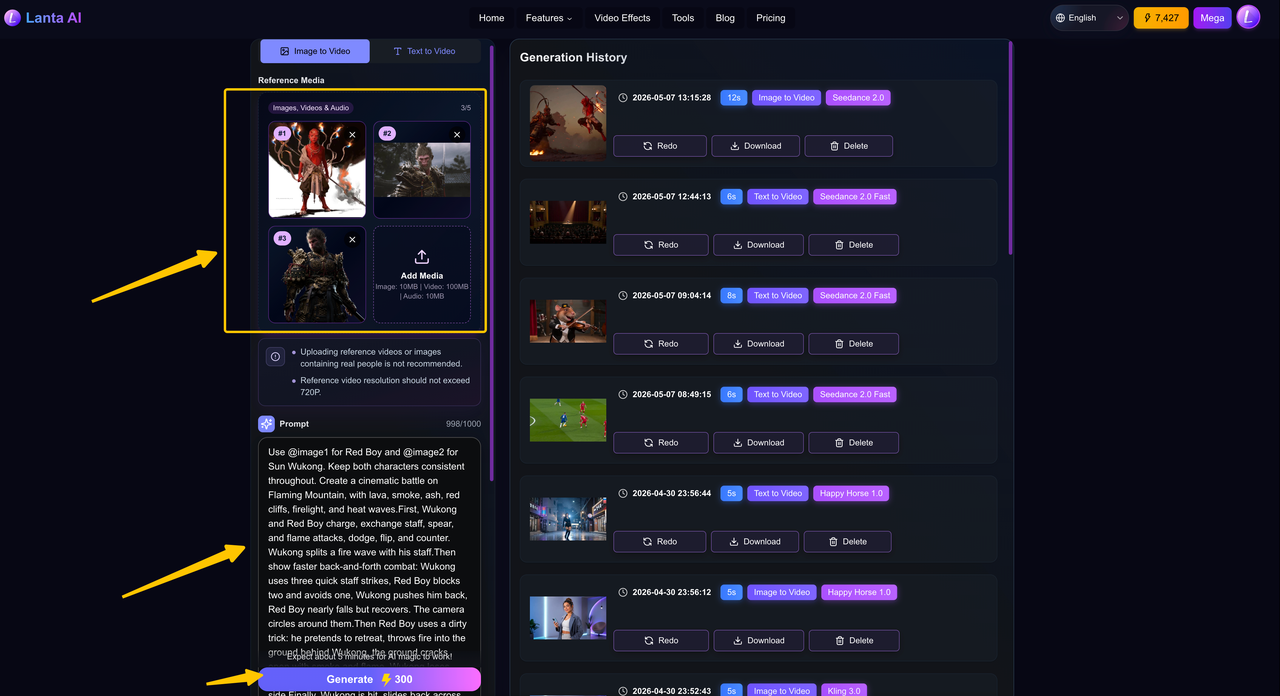
Result
The whole video looked impressive. Red Boy's charge, Sun Wukong swinging the golden staff, Red Boy breathing fire, and Sun Wukong blocking the attack with his power all felt close to an official animated production.
Overall, the action and visual quality were the biggest surprise. The model handled magical power bursts, fire effects, large-scale attacks, and energy collisions very well. It also captured the visual style of the IP quite accurately. With more detailed prompts, the result could likely be pushed even further.
However, this scene also had strong storytelling demands. The model was good at big action and visual effects, but it struggled with small emotional details. For example, it was hard for the model to show a clear emotional change from arrogance to fear. This became one of the main limits of the final video.
Multimodal Reference Test
Next is the multimodal reference test. We first tested Seedance 2.0's ability to reference audio.
The first audio file used for testing was Blue Bird. We provided the chorus section of Blue Bird to the model, along with an image of a concert with a massive audience.
The most surprising part was that the model could create or restore content on its own. For example, the three seconds before the actual singing began were not provided by us. The model extended this part by itself. The melody matched the original song, but it was presented with the atmosphere of a live performance.
Even more impressive, the singer's lip movements matched the song perfectly. The only regret was that the file we provided was already close to 15 seconds long. After the model extended it by another three seconds, there was not enough time left, so one line at the end was skipped.
Next, we tested video references. This is probably the part that best shows what makes Seedance 2.0 different. Generating videos from sound effects or music is not entirely new. For example, Meta's MoCha model has already explored similar ideas.
In this test, we took a more creative approach by replacing Levi with Zenitsu Agatsuma from Demon Slayer and having him fight the Beast Titan. Because the two characters have very different fighting styles, we did not try to recreate every complex frame-level movement. Instead, we focused on one clear signature move: Thunder Breathing, First Form: Thunderclap and Flash.
The result was surprisingly impressive. The model captured the feeling of a small, fast character fighting a giant enemy in mid-air, while also showing strong wind effects, golden lightning, high-speed rushing movement, and powerful thunderstorm impacts. It even used close-up shots of the Beast Titan's face to show shock and fear, while following the original action logic by having Zenitsu dash along the Titan's arm toward its head.
In our video reference test, we found that video references guide the model better than still images. Instead of just copying visual elements, the model can follow the rhythm, camera movement, and action style of the reference video. It can even recreate the feel of different anime or movie styles.
However, this level of control is still hard to achieve, and the results are not always consistent. When the scene becomes too complex, the model starts to hit its limits. If the prompt contains too much information or too many small logical steps, the model may struggle to follow everything. In those cases, it often falls back on fast montages or trailer-like fragments to make the task easier.
Even so, creative mixing can still lead to surprising results. The details are not always accurate, but the model's ability to create expressive and visually exciting videos already feels strong enough for real production use.
Limitations of Seedance 2.0
Although Seedance 2.0 has taken a major step forward in controllability, it is still far from a perfect world simulator. Compared with competitors such as Sora 2 and Google Veo 3.1, Seedance 2.0 does not lead in every area.
Complex Physical Effects Still Lack Realism
Current AI video models still seem to model the physical world more through pattern matching than first-principles reasoning. This means they can still show weaknesses when handling complex or uncommon physical interactions.
For example, simple water splashes generated by Seedance 2.0 can look decent. But with more complex liquid flow, cloth folding and stretching during fast movement, or subtle hair motion, the output can still look stiff and less realistic.
When handling collisions, stacked objects, or fine object manipulation, Seedance 2.0 can still show common AI quirks such as clipping, floating, or unnatural acceleration. Its understanding of spatial relationships, object contact, and how force passes between objects still needs improvement.
Long-Form Video Creation Still Suffers From Drift
Although Seedance 2.0 can maintain good coherence within a single generation of around ten seconds, problems start to appear as the video gets longer. At present, all video models still face the challenge of memory decay.
In a narrative video that lasts several minutes, the model needs to keep character motivation, scene details, and object states consistent over time. That requires strong long-term memory, which is still difficult for current video models. For now, this type of video still needs manual editing and segmented generation to keep the result coherent.
In some user-generated videos, even Seedance 2.0 may show slight texture drift or flickering in the second half of the clip, especially around fine patterns, text, or background details.
Realistic Text-Only Content Can Fall Behind Competitors
Compared with Sora 2 and Veo 3.1, Seedance 2.0 shows clear advantages in several areas, but it also has some weaknesses.
Sora and Veo seem to focus more on simulating a real world, while Seedance 2.0 focuses more on building a controllable set. For short content that needs fast output and very high realism, Veo 3.1's native audio-video sync may be the better choice. But for professional creators who need fine control over character performance, camera language, and visual style, Seedance 2.0's more director-like workflow can be more attractive.
When generating purely realistic content from text alone, without references, Seedance 2.0 can sometimes fall behind its competitors in human realism and subtle lighting details. This may come from different choices in model design and training data focus.
Final Thoughts
Seedance 2.0 has become much more reliable. Even when a generation fails, it rarely becomes completely unusable. There are usually parts that can be kept, edited, or reused. This matters because it shifts the question from can AI video be used to how can we use it better.
Its strongest foundation is storyboarding. When the prompt is clear and the information density is reasonable, the model can follow multi-shot structures, action logic, and camera directions with strong completion quality. However, its storytelling still feels more like finishing the task correctly than expressing it with a strong directorial vision.
Seedance 2.0 is also impressive in action, VFX, and reference-based generation, especially when using visual or video references for style fusion. But when a scene requires very fine emotional control, dense narrative meaning, or precise frame-by-frame intention, the model still tends to fall back into safer choices.
If you also want to try AI video generation, visit the Seedance 2.0 page on Lanta AI and start creating today.